
 Rigel of Midgard
Customization and client
SmartCast: shortcut modes
Configure normal or repeated use for each bar slot and apply changes to your character.
Open and select a slot
Open SmartCast from the menu or use:
@smartcastpanel
There are two bar tabs and four groups of nine slots per bar: 72 assignments. Arrows change the displayed group.
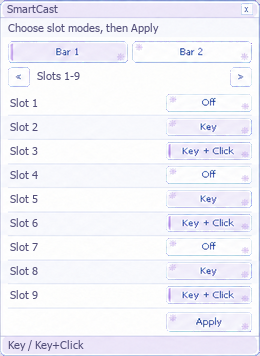 Illustrative view; shown slots are examples.
Choose a mode
Each row cycles through:
- Off: normal shortcut use.
- Key: repeats while holding the key.
- Key + Click: repeats with a held key and world click. Press Apply to save and apply. World clicks pause over client windows. Repetition does not remove skill timings or requirements.
Avoid duplicate shortcuts
Do not assign the same key to SmartCast and another repetition system, such as Macro Panel or an ATK/DEF macro. Releasing the shortcut stops repetition. Modes are saved per character. Restore the window position with:
@smartcastpanel reset
See macros and skill timing.