
 Rigel of Midgard
Customization and client
AutoPot: HP and SP potions
Choose consumables and HP/SP thresholds and control each channel from its window.
Configure consumables
Open AutoPot from the client menu.
- Drag a potion or consumable from inventory into the HP or SP slot.
- Set the percentage with −/+.
- Enable the corresponding channel. HP and SP are controlled separately.
The icon counter shows remaining items, including zero.
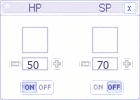 Illustrative view; this is not a screenshot of a game session.
When a potion is used
The channel attempts to use its item when HP or SP is at or below the chosen percentage. HP has priority if both need replenishment. It stops sending uses when no items remain. The potion must be usable on your map and in your current state. Enabling a channel does not bypass item restrictions.
Stop or change a channel
Disable its switch to stop it. Right-click clears and disables the slot. Closing the window keeps active channels running. Settings are saved per character. Keep the older Autopot off while using this panel:
@autopot off