
 Rigel of Midgard
Customization and client
Macro Editor: sequences and ATK/DEF
Configure sequences of up to six steps or attack and defense equipment sets with a dedicated shortcut.
Choose a macro
Open Macro Editor from the menu or use:
@macroeditor
Choose one of the 12 macros on the left. Each preserves Sequence and ATK/DEF settings separately. Use Assign key / skill to explicitly capture a shortcut.
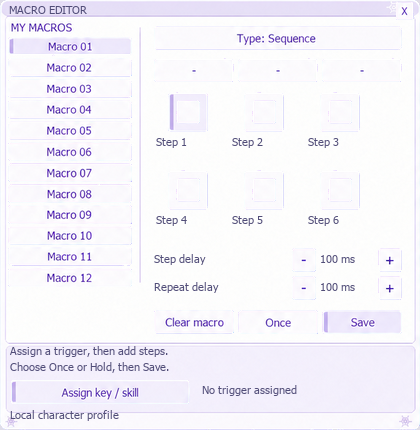 Illustrative Sequence view; it does not show all ATK/DEF options.
Sequence
Drag supported elements into slots for up to six steps. Choose single or held execution, adjust intervals and save from the editor. Right-click clears a step or the entire macro depending on where you click. Check the shortcut and steps before combat.
ATK/DEF
Prepare up to six attack equipment pieces and six defense pieces. While holding the shortcut, it requests ATK equipment and repeats the skill. Releasing stops repetition and requests DEF when your state allows equipment changes. Key and key + click modes are available; ATK/DEF always requires holding the shortcut. Intervals range from 10 to 2,000 ms in 10 ms steps. Short intervals do not remove cast, animation or skill requirements. Selection distinguishes the exact equipment copy. Recheck slots if you remove or replace that piece. Settings are saved per character.
Older Macro Panel
@macropanel
@macropanel reset
@macroeditor reset
The older panel configures repetition with Off, Key and Click; Click means key + click. Press Apply. It provides neither sequences nor the editor's ATK/DEF sets. Avoid multiple systems on the same key. See SmartCast.